
Privacy Promise
Your manuscript stays yours.
Writing deserves privacy by default. Inkwell is local-first, and you control whether AI is available.
You should be able to write without wondering where your words are going.
Your work is not training data.
Your manuscript is not training data. Your drafts are not "content." They are your creative work.
Local-first by default. AI is opt-in, not assumed.
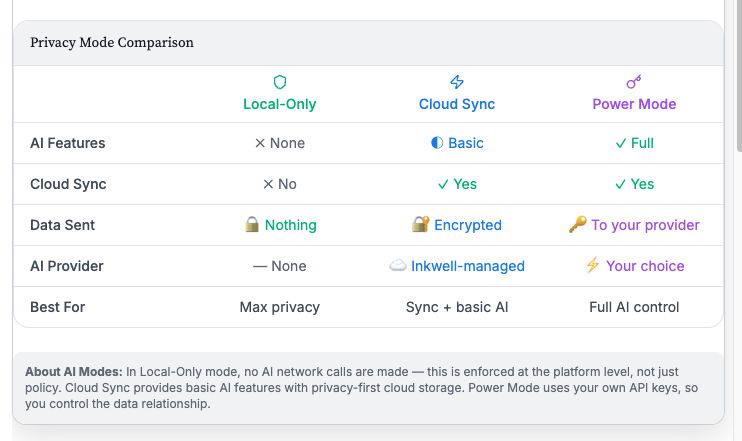
Three modes. One clear choice.
Inkwell offers three modes so you can decide how you want to write, and what you want enabled.
Maximum separation
All AI features are disabled. Drafts stay local.
- All AI calls are blocked at the system level
- No hidden calls, no exceptions
- Your writing stays on your device
Cloud storage with AI (Pro)
Sync across devices with access to limited AI tools, included with Pro.
- Cloud storage for cross-device access
- Included AI tools for essential features
- No API key required
Your key, your provider
Bring your own API key for full AI features. You choose the provider and the cost.
- You provide your own AI API key
- Full AI toolkit unlocked
- AI runs under your provider account
AI preview and consent.
Before any AI request runs, Inkwell shows you the exact manuscript excerpt that would be sent.
AI can suggest edits, but it cannot change your draft automatically. You choose what to insert.
Style lint: local quality checks
Style lint runs locally to flag common generic phrasing patterns before suggestions are inserted.
- Catches templated or overly generic AI phrasing
- Flags repetitive patterns and clichés
- You can still insert anyway—lint is guidance, not a block
Centralized enforcement, not just a toggle.
Inkwell's privacy controls are enforced through a centralized privacy gateway that respects your selected mode.
How the Privacy Gateway Works
- If AI is off, AI stays off
- No hidden calls
- No accidental sending
- No feature back doors
Local analysis: clarity without upload
Inkwell includes analysis tools that run fully on-device:
- Timeline consistency checks
- Character fidelity heuristics
Transparency: AI activity logging
When AI is enabled, Inkwell logs AI activity so you have visibility into usage. You can see what happened and when.
Cloud sync is optional
Inkwell supports cloud sync for writers who want cross-device continuity. You can keep sync off if you prefer offline-first writing.
- Gated by subscription entitlements
- Separate from Local-only mode
- Conflict-safe by design
What Inkwell does not do
- Sell your writing
- Use your writing to train AI models
- Turn on AI features without your permission
- Enable cloud sync unless you choose it
The bottom line
Trust is a product feature.
Inkwell is built so you can choose the writing environment that fits your values.
- Local-only: for writers who want zero AI and zero cloud
- Hybrid: for writers who want cloud sync with AI tools (requires Pro)
- Power Mode: for writers who want full AI, with direct control via their own key